How to check the status of your Spanish nationality file on the Ministry of Justice website

Go to the Ministry of Justice sede, choose “Tramitación On-line sin Certificado Digital” and fill in your NIE, application number, year and date of birth. The Ministry gives this route for files from 2014 and earlier, and its notifications leaflet links to the same form under the name “¿Cómo va lo mío?”. For 2015 files, its page asks for the electronic certificate you filed with.
Enter the date on your filing receipt and the tracker shows when the one-year period ends and what each step means, with its official source. It is free, needs no account, sends nothing, and only remembers your details in your browser if you tick the box.
Track my file for freeSources: Ministerio de Justicia, sede electrónica: Nacionalidad española por residencia (block “Consulta telemática de expedientes”) and its PDF user guide; Ministerio de Justicia, Información sobre nacionalidad por residencia; sede, ¿Cómo va lo mío?; leaflet on notifications in the DEHú. Read and captured on 20 October 2026. We sent no data to the form: the screenshots show it empty. The official pages are in Spanish.
Which route applies to your file?
It depends on the year you filed. The Ministry’s page on nationality-by-residence information says the status of files from 2014 and earlier is on the sede, under “Consulta telemática de expedientes de nacionalidad española por residencia”. Files from 2015 are checked under “Solicitud de nacionalidad española por residencia (Acceso para ciudadanos)”, with the electronic certificate used to file. The same page adds, without tying it to a year, that this information is given “exclusively” online or by phone (902 007 214 or 91 837 22 95) or Telegram (justicianacionalidadbot).
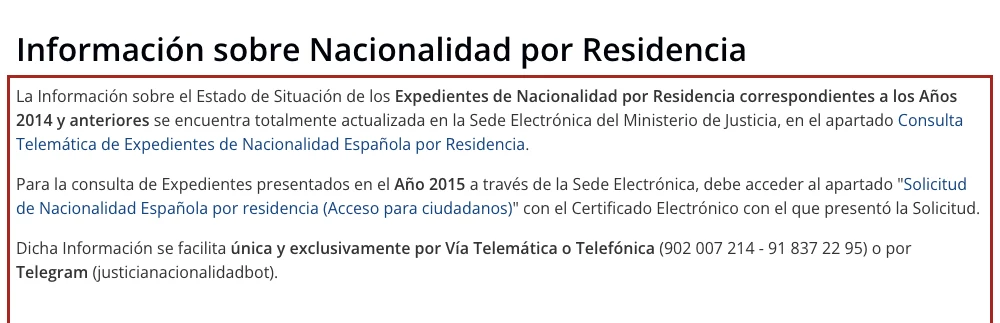
The page does not mention files from 2016 onwards. The form page on the sede mentions no year: it says “you can check here which stage of the process your file is at”. The Ministry’s leaflet on notifications tells you to check the status of your nationality file in the “¿Cómo va lo mío?” section and gives the address of the same form (sede.mjusticia.gob.es/eConsultas/inicioNacionalidad), also without a year. We have no real file to test with, so we cannot tell you whether the form answers for a more recent application. The sede also has a general page called “¿Cómo va lo mío?”, which asks for Cl@ve and shows the status of the Ministry’s applications in progress.
How do you check with your NIE, number, year and date of birth?
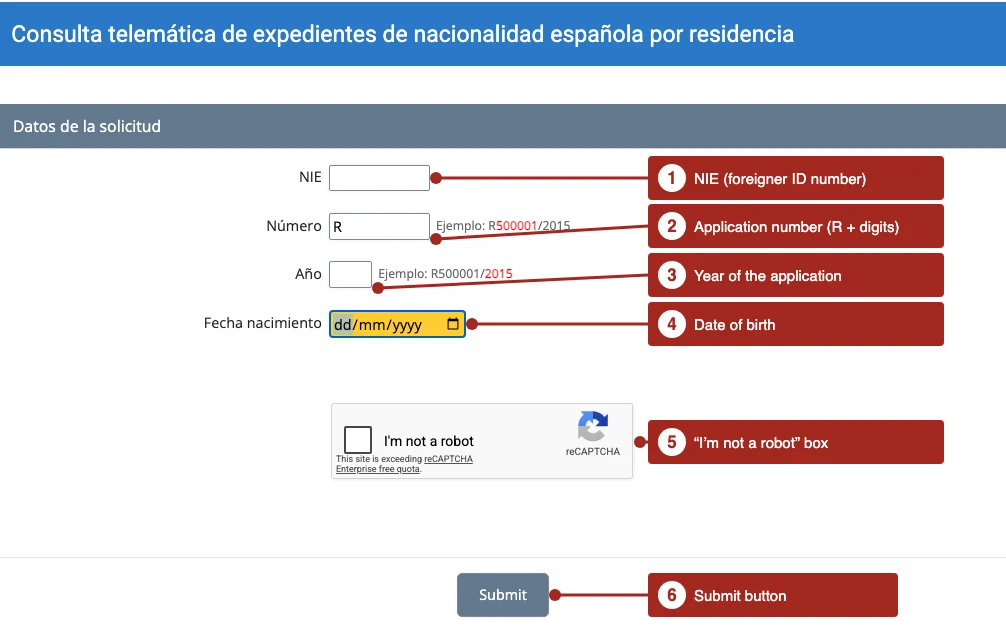
There are seven steps, the same ones as in the Ministry’s guide. You need your NIE and your application number with its year.
- Open the sede at sede.mjusticia.gob.es/es/tramites/nacionalidad-espanola.
- Click “Tramitación On-line sin Certificado Digital” in the block “Consulta telemática de expedientes de nacionalidad española por residencia”.
- Type your NIE (callout 1).
- Type the application number (callout 2). The field already has the “R”: in the form’s own example, R500001/2015, the number is 500001.
- Type the year (callout 3), which in that example is 2015, and your date of birth (callout 4).
- Tick “No soy un robot” (callout 5), follow the verification instructions and click “Verificar”.
- Click “Enviar” (callout 6). The screen shows the information on your application.
What does the check show?
The sede says it shows the stage your file has reached and, for grant decisions already notified, lets you open the original document in electronic form. It adds that the information on that page is not a notification: the official notification reaches you by the route you gave when you filed, and the Ministry’s leaflet explains how to open it in the DEHú.
What we found on no official page is the list of stages the screen can show, or what each one means. That is why we do not turn each status into a waiting time or a promise here. What the sources say about each step is in the free file tracker. The wording an official body recorded from the screen, and the steps the regulation lists, are in the status words guide.
What if nothing shows up, or your file is more recent?
- Check your details. The number, year and date of birth must be those of your application.
- Try the phone or Telegram route the Ministry gives: 902 007 214 or 91 837 22 95, or justicianacionalidadbot.
- Try the general “¿Cómo va lo mío?” page on the sede, which asks for Cl@ve, if your application is from a year the Ministry’s page does not name.
- Work out where your deadline stands. The maximum period is one year, and the real figures are in how long nationality by residence takes (page in Spanish).
Knowing the state of the procedure at any time is a right of anyone who is a party to it (Ley 39/2015, art. 53.1.a).
Frequently asked questions
How do I check the status of my nationality-by-residence file?
On the Ministry of Justice sede, with “Tramitación On-line sin Certificado Digital” and your NIE, number, year and date of birth. The Ministry gives it for files from 2014 and earlier, and its leaflet links to the same form without a year.
Do I need a digital certificate to check the status?
The NIE form does not ask for one. For 2015 files, the Ministry’s page names the electronic certificate used to file, and the general “¿Cómo va lo mío?” page uses Cl@ve.
Where is my application number?
The form shows the format with an example, R500001/2015: the number is 500001 and the year is 2015. The Ministry’s guide calls it “the application number”.
Does the check replace the official notification?
No. The page itself says the information it offers is not a notification.
Can I check by phone?
The Ministry’s page gives the numbers 902 007 214 and 91 837 22 95 and the Telegram bot justicianacionalidadbot, without naming a year.
Enter the date on your filing receipt and the tracker shows when the one-year period ends and what each step means, with its official source. It is free, needs no account, sends nothing, and only remembers your details in your browser if you tick the box.
Track my file for free